

- Published on
Silent Glucose Alerts With a 30€ Smart Band
- Authors

- Name
- Robert Vesterinen
Disclaimer
This post is based on my personal experience and is for informational purposes only. I’m not a medical professional, and I’m not responsible for any issues that may arise if you try to configure similar alerts on your own. Please consult your healthcare provider or device manufacturer before making changes to your glucose monitoring setup.
Introduction
A little background about me: I’ve had Type 1 Diabetes since I was 4 years old. Most of my life, I used a traditional glucose meter that required blood samples from my finger. I managed fairly good blood glucose control using that and insulin pens. For a diabetic, good control is critical—it helps prevent life-threatening complications later on.
This is why we have yearly checkups with diabetes nurses and endocrinologists who monitor our HbA1c values (which indicate long-term glucose control) and past blood glucose readings. The better our monitoring tools, the better our control. These devices help us react quickly to highs or lows and spot recurring trends. In other words, they help keep us alive and healthy.
Continuous Glucose Measurement (CGM)
In the past, you had to take your glucose meter out of your backpack or pocket, insert a testing strip, use a finger-pricker, and take a blood sample. Nowadays, it’s much easier with CGM devices. The old meters could only give a single reading—a single data point. If your glucose was rising or falling quickly, you wouldn’t know unless you measured frequently. That constant need to check caused fatigue. Personally, I almost burned out. I spent countless nights awake, worrying that my glucose would drop too low and I wouldn’t wake up. Sadly, many Type 1 Diabetics have died in their sleep from hypoglycemia.
The first CGM I used was the Dexcom. It was a dream come true. I could monitor my glucose in real-time from a small device—no manual checking needed. Finally, I could sleep without worry. Unfortunately, the trial lasted just 4 weeks. Then I had to return the device to healthcare providers.
Next, I got the Freestyle Libre 1, which reads glucose from interstitial fluid. A great device, but it required scanning to see readings—it couldn't alert me to dangerous glucose levels. The next version, Libre 2, added alerts, but didn’t send glucose data unless you used a third-party app. Still, I was happy with the setup. Technology had evolved fast. CGMs even inspired projects aiming to create artificial pancreas systems that automate insulin delivery. (That’s a topic for another day.)
So, was I finally able to sleep peacefully?
Alert Fatigue
Blood glucose control is like walking a tightrope... in a f*cking thunderstorm. Everything affects your levels. Drink an extra cup of coffee? Hello, spike. Walk too fast to work? Boom, a low. Stressful day? Good luck staying under 10 mmol/L. Don’t even mention pizza night...
Yes, you can be proactive, count carbs carefully, and avoid junk food. But after 27 years with this disease, I can confidently say: sometimes the numbers just make zero sense.
Thankfully, CGMs notify us when levels go off track. That helps. But on bad days (like Pizza Fridays), the number of alerts is exhausting. The CGM and app are just doing their job—warning you. But it leads to alert fatigue.
Worse still, Abbott (makers of Libre CGMs) updated their app to only use alert sounds that—no joke—sound like a fire alarm. You can't even adjust the volume (at least, I couldn’t find a way). The day that update hit, I started looking for alternatives. My girlfriend—now wife—was not happy with 3 AM fire alarm sounds.
So, I needed a way to get my glucose data from Abbott and generate alerts with custom sounds and volumes. If I could access the data, I could do whatever I wanted—Excel sheets, alerts, analysis. It's my data, not Abbott's.
Nightscout + xDrip+ + LibreLinkUp Collector
Abbott doesn’t make it easy to access your data. Thankfully, I found nightscout-libre-linkup on GitHub. LibreLinkUp is an app for monitoring multiple Libre sensors—typically used by parents of T1D children. The Nightscout collector pulls data from LibreLinkUp and uploads it to Nightscout, your own self-hosted CGM platform (an alternative to Abbott’s LibreView).
Now I could fetch data from LibreLinkUp and upload it to Nightscout regularly. Great! But how to get alerts on my phone?
That’s where xDrip+ comes in. It’s an unofficial Android app that acts as a hub for glucose and even heart-rate data. Crucially, it supports Nightscout integration and has powerful alerting tools. You can set thresholds, configure snoozes, and even set a “missed reading” alert as a kind of heartbeat check.
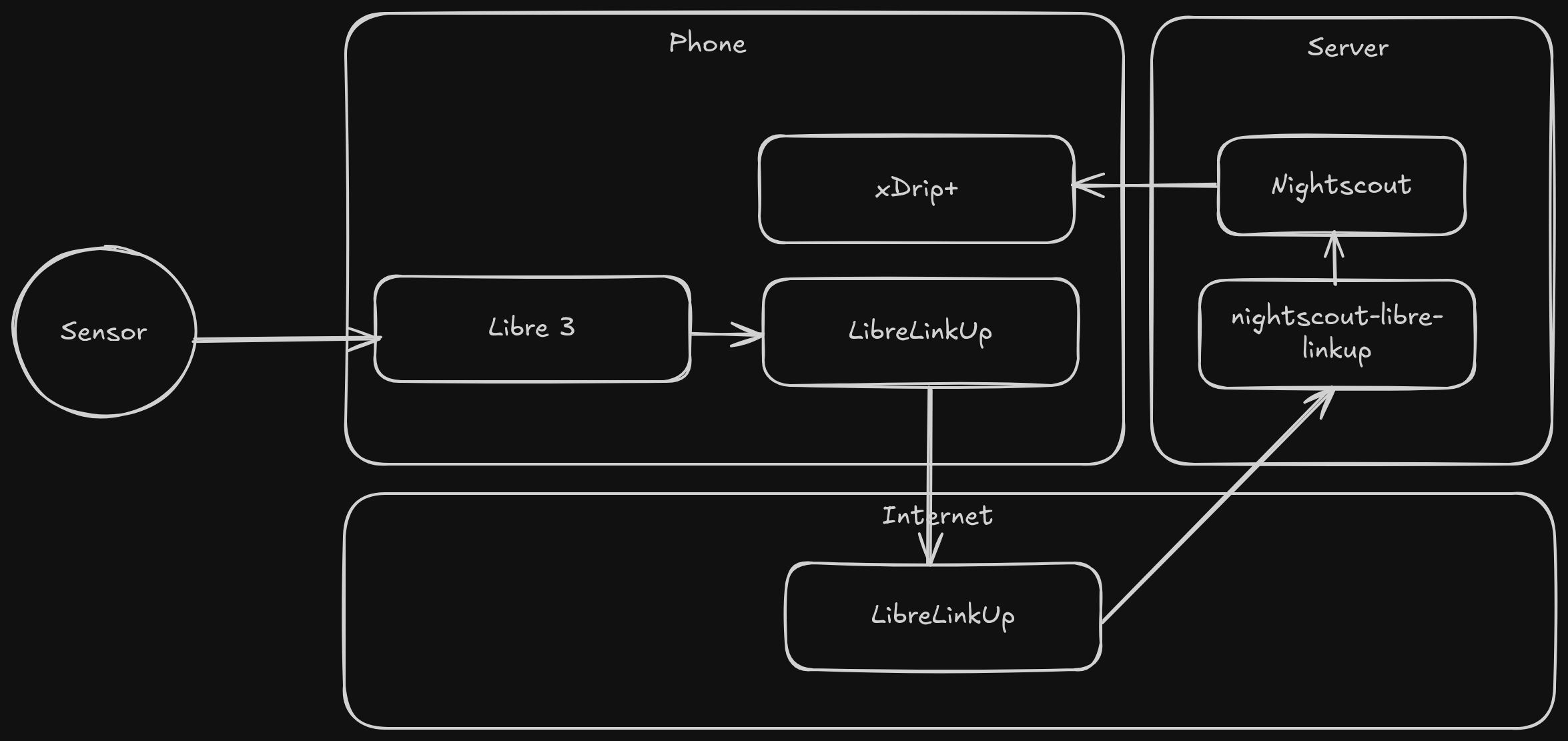
Sensor Data Flow
Finally, I could configure alert sounds, adjust snoozes, and set everything to my liking.
Not in the Clear Quite Yet
While my complicated setup worked for years, there was still one big problem: even the quieter alerts could wake up my wife. And now that we’re expecting a child, that’s a real issue. Imagine an alert going off at night with a sleeping baby in the room...
So, what to do? How could I keep the bedroom silent and still make sure I don’t die from unnoticed lows? (Don’t worry—I usually wake up to lows even without alerts.)
Eventually, I found the answer: a smartwatch I could wear at night that vibrates with glucose alerts. But I hate smartwatches... I like regular mechanical (Or GShock) watches. So—what about a Smart Band?
Xiaomi Smart Band 7
I stumbled upon an unofficial Android app called Watchdrip, which sends BG data from your phone to a smart band. The Xiaomi Smart Band 7 was on the supported list. Great! It’s an older device (launched 2022), hard to find—but I got one for just 30€.
It has basic features like heart rate, steps, and sleep tracking. I didn’t care about those—I just wanted the small form factor. Maybe I could wear it on my right wrist and my regular watch on the left.
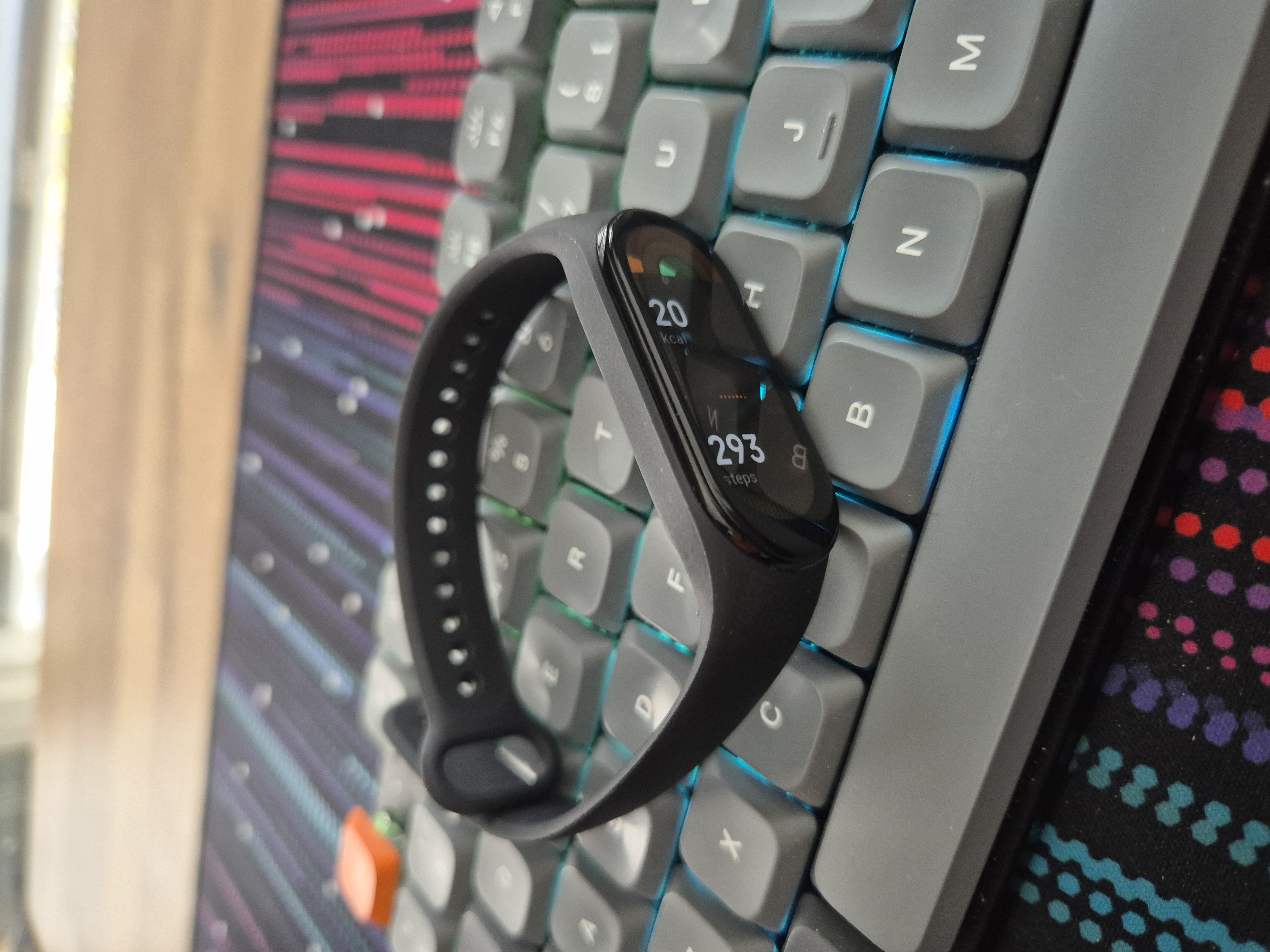
Xiaomi Smart Band 7
It felt surprisingly solid for the price.
The Setup
While waiting for delivery, I read the Watchdrip developer’s blog, which explained how to pair the band and install a custom watchface showing BG values. Then I read the comments—an oh man. Many users reported issues: stuck watchfaces, failed pairing, etc. Most problems were with model 261.
When the band arrived, I checked the model... yep, 261. Not supported by Watchdrip. I tried anyway—no luck.
The Workaround
Watchdrip didn’t work. I considered returning the band. Then, while reading GitHub issues and pleading with the AI gods, this time I actually got a helpful suggestion instead of the usual hallucination from ChatGPT: try Gadgetbridge.
It’s an open-source Android app that can connect headphones, smartwatches—and smart bands! No vendor app required. I love the open-source community. Vendor apps are usually garbage anyway.
Gadgetbridge
Pairing wasn’t trivial. You need an authentication token (I won’t explain how to get it—do your research). After getting the token, I could scan, long-press the Smart Band, enter the auth key—and voilà. (I needed to unpair the smart band from my phone's BT settings first)
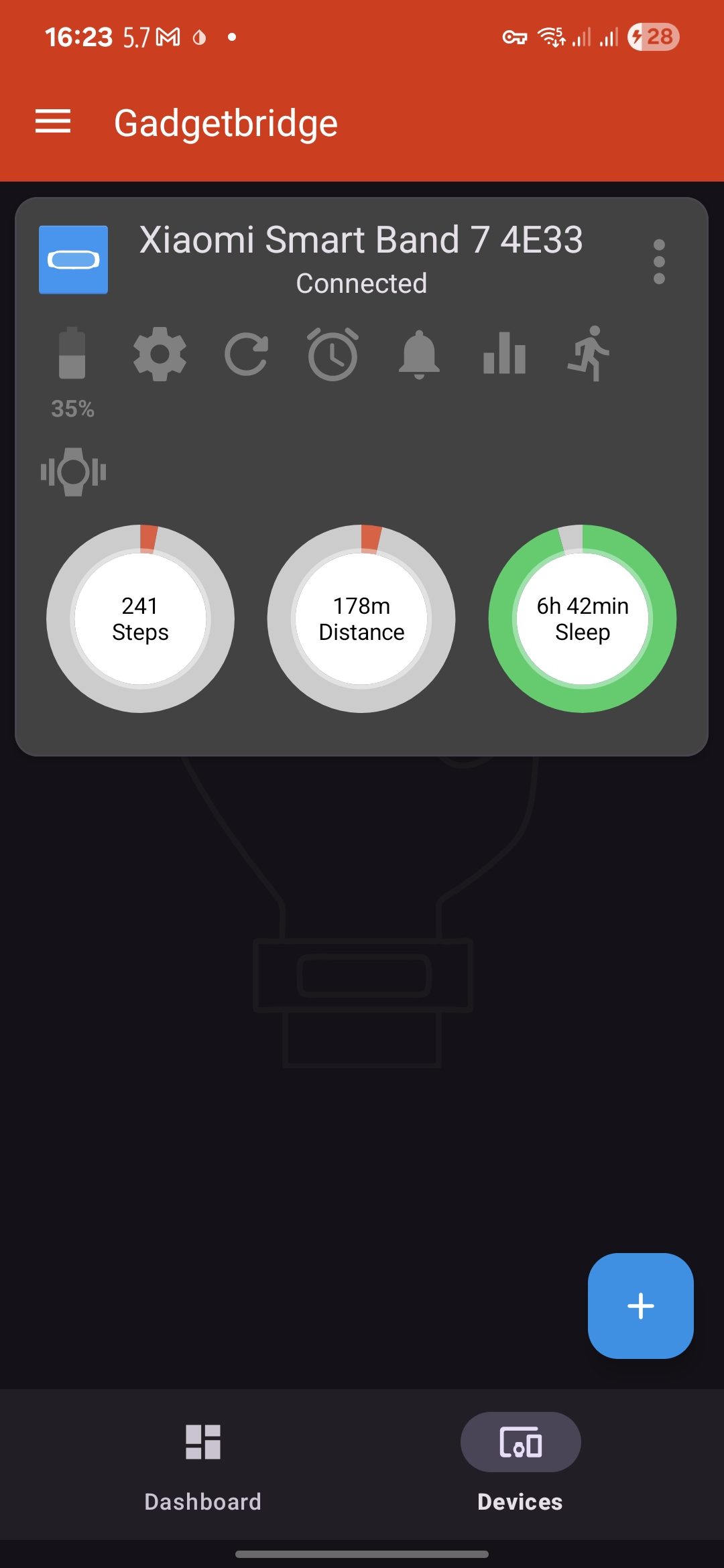
Gadgetbridge Dashboard
Here are the key settings to configure:
- Gadgetbridge Settings → General Settings
- Connect to devices when Bluetooth is on: ✅
- Gadgetbridge Settings → Notification Settings
- "...also when screen is on": ✅
- "Ignore low priority notifications": ❌
- "Per application settings": Allow only xDrip+
- Device Specific Settings → Calls and Notifications
- Send notifications: ✅
- Screen on for notifications: ✅
- Auto-remove dismissed notifications: ✅
- Vibration → Generic notification → Repetitions: 10 (modify to your liking)
- Device Specific Settings → Connection
- Connect on device signal: ✅
- Auto-reconnect: ✅
I also enabled screen dimming at night and lift-to-wake. These can be scheduled for night time as well.
Juggluco
So, how do you send BG data to the band? Through Juggluco, a 3rd-party Libre app. It sends data to Gadgetbridge as... wait for it... weather data. Kind of hacky but I like it.
Still, it works. Juggluco is open-source, well-documented, and replaces the official Libre app. It can still send data to LibreView for your doctor, though they might notice something’s different.
Enable the Gadgetbridge integration in Juggluco. The BG value and trend arrow appear on the smart band’s weather widget.
Custom Watchface
Now that BG values are showing up, how do we display them clearly? I eventually found a custom watchface made by another diabetic from Github forums. There is a way to program these watchfaces as well. I'll write a post about that when I get the chance to do that.
I installed it using an Android app called Mi Band 7 Watch Faces.
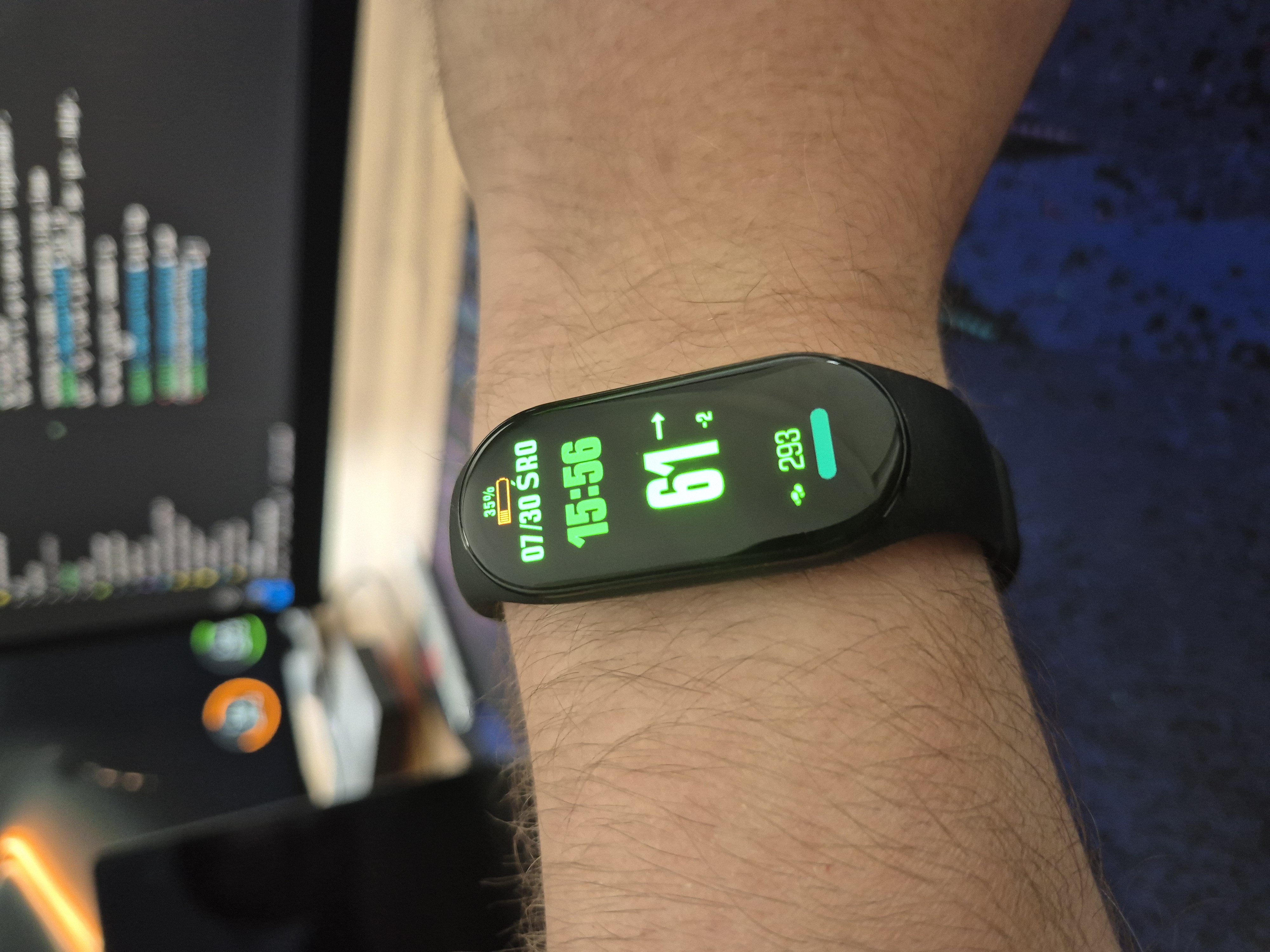
Mi Band Custom Watchface
Tasker
One last issue: what if the Smart Band disconnects from Bluetooth? I need an alert for that—my only BG alert now is on the band.
The tool that I chose was Tasker. I have used this for many years for different automation needs and it fits this use case perfectly.
The logic:
- Detect when BT connection is lost.
- Wait 5 minutes.
- If still disconnected, alert again.
Steps:
- Create a profile with Event: BT Connection.
- Set condition:
%bt_address ~ your_device_mac_address AND %bt_connected ~ false - Create task: "BT Alert".
- Action: Bluetooth Info → Single Device → Your MAC address.
- If
%bt_connected ~ false, then:- Action: Notify
- Action: Wait 5 mins
- Action: Goto Action 1 (loop)
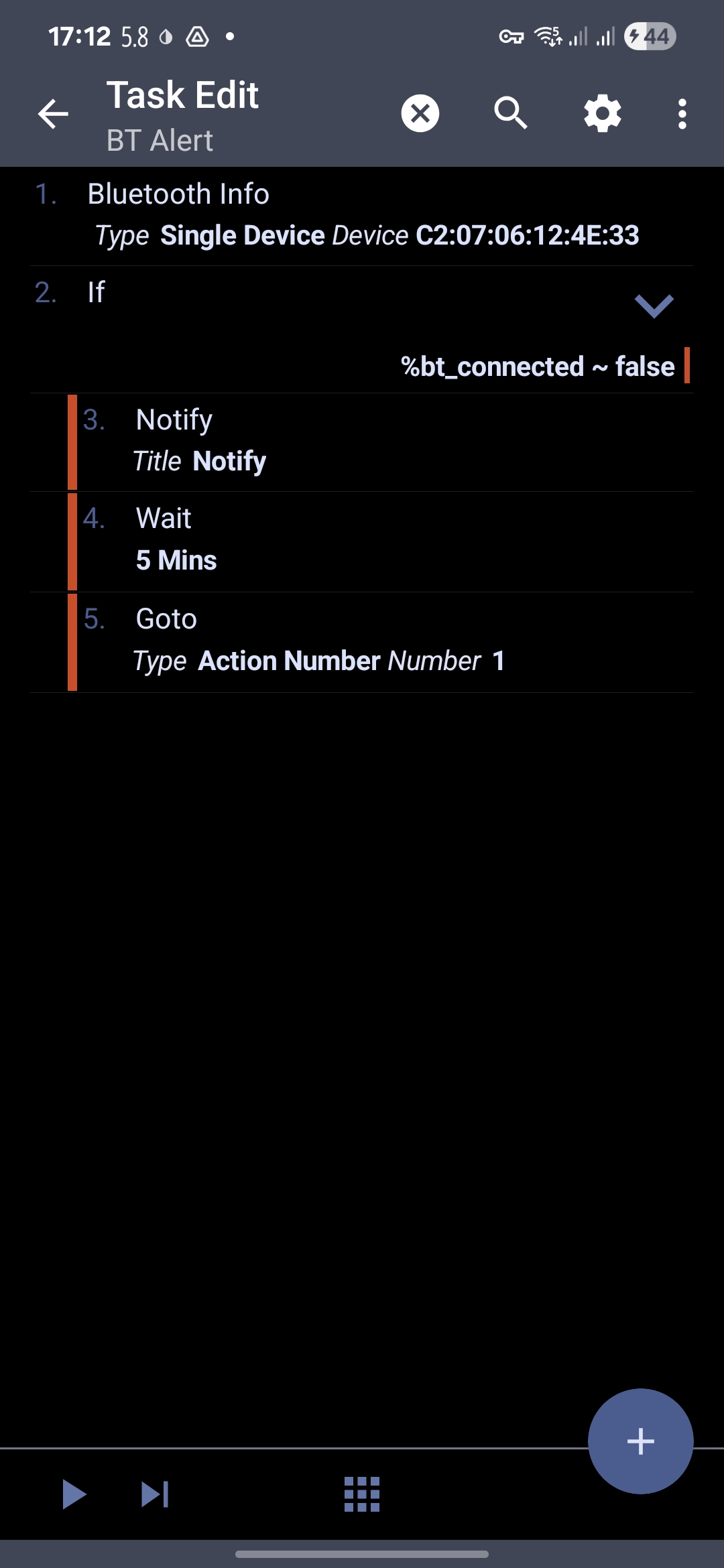
Tasker BT Alert Task Screenshot
Thoughts
This setup was unnecessarily complex and time-consuming—but it makes my life easier. My wife (and soon, our baby) won’t be woken by my alerts. I can check my BG at a glance. And the battery? It’s lasted over a week and still has 30% left. Amazing compared to smartwatches.
If you're doing a similar project, I'd recommend a regular smartwatch supported by Watchdrip. That route might be less painful. xDrip+ also supports Android Wear watchfaces so you could opt for those devices too.
There are around 50,000 Type 1 Diabetics in Finland. Some get to use CGMs, some don’t. These tools impact our health and life expectancy. We shouldn’t have to jump through hoops for such basic functionality. I'm grateful for the open-source community building these tools, but not everyone is tech-savvy. Hope this post will help other Type 1 Diabetics and give some perspective to what it's like to be one.