

- Published on
The beginning of my self-hosting journey
- Authors

- Name
- Robert Vesterinen
Introduction
I think the first question to ask yourself when starting a project like this is: why? What do you gain from spending your time researching hardware, setting up your services, and dealing with everything that comes with it:
- Virtualization
- Containers
- DNS
- Certificates
- VPN
- Reverse proxy
- Networking
I mean, it’s a lot... and it takes a lot of time. And honestly, it will never truly be finished.
I remember an IT Service Management course I took at university, back when I was studying to become a network engineer. In that course, we had to build the entire IT infrastructure for a multi-site organization. And when I say infrastructure, I mean everything — networking, multi-site VPN, Active Directory, services like ticketing systems, websites, mail servers, and PKI.
We had to implement it all ourselves, document everything, and present weekly reports. As if that wasn't enough, in the final week of the course, we had to perform a security audit based on KATAKRI — the Finnish National Security Audit Criteria — and, of course, fix all the findings. It was one of the toughest courses I took, but honestly, I learned so much from it. I still use many of those lessons today in my daily work as a DevOps specialist.
Fast forward to today. I’d been lurking in Reddit’s r/homelab for a while and thinking about this whole homelab idea. What could I gain from it? Sure, it would be great to "de-Google" my services and improve my privacy. It would be even better to spin up quick PoCs, host my own LLM models, or run automation tools on my own hardware.
But would it really be worth the time?
Then I thought back to that course — how excited I was to configure switches, set up Active Directory, deploy PKI, and build VPN tunnels. How satisfying it was to get everything working just the way I wanted. I wanted to experience that feeling again. And of course, there’s the professional value — this hobby could genuinely benefit my career.
So I started drawing network diagrams, planning storage, and listing the services I wanted to run in my homelab.
The final push came after reading Jeff Geerling's Project MINI RACK series — a guide for miniature rack builds and compatible 10” hardware. I mean, how cool is that — a compact rack setup with serious functionality? I ordered the hardware on the same day that I read it.
This 10” form factor was perfect for my situation. I live in a fairly small apartment and don’t have much room to spare (my wife definitely wouldn't be thrilled if I took over the living room with a full-size rack).
I began researching hardware and where to find it from here where I live. I eventually found that a Swedish company called Dustin sold exactly what I needed.
The Hardware
Here’s what I ended up ordering for the rack:
- Digitus 10" 9U Wall Cabinet
- 2x Direktronik Rack Shelves
- Digitus Socket Strip for Rack
- 2x Prokord Rack Cover Panels (purely cosmetic)
- Digitus DN 19 Rack Screw Set (the cabinet came with screws... but hey, extras never hurt)
- Netgear GS308E Managed L2/L3 Switch
(Note: The product page said it was PoE, but it wasn’t) - Digitus 10" Patch Panel + Keystone Jacks
- Some Cat6 cables
With the rack built, I turned to compute. I looked into the used market, especially MiniPCs, and found a site called Refurbed that sells refurbished hardware. I ended up buying two Lenovo ThinkCentres:
- Lenovo ThinkCentre M710Q Tiny
i5-6400T | 16 GB RAM | 240 GB SSD - Lenovo ThinkCentre M910Q Tiny
i5-6500T | 16 GB RAM | 256 GB SSD
Both arrived in excellent condition.
I also had a couple of old Raspberry Pis lying around, so I mounted one in the rack as well.
I didn’t have a strict budget, but I estimate the total cost was around €700.
In hindsight, I probably should have opted for more RAM and bigger SSDs. Thankfully, both ThinkCentres support upgrades — they have extra RAM slots and space for more storage.
The "Final" Product
This setup has actually been running for almost a year now!
Here’s what it looks like:
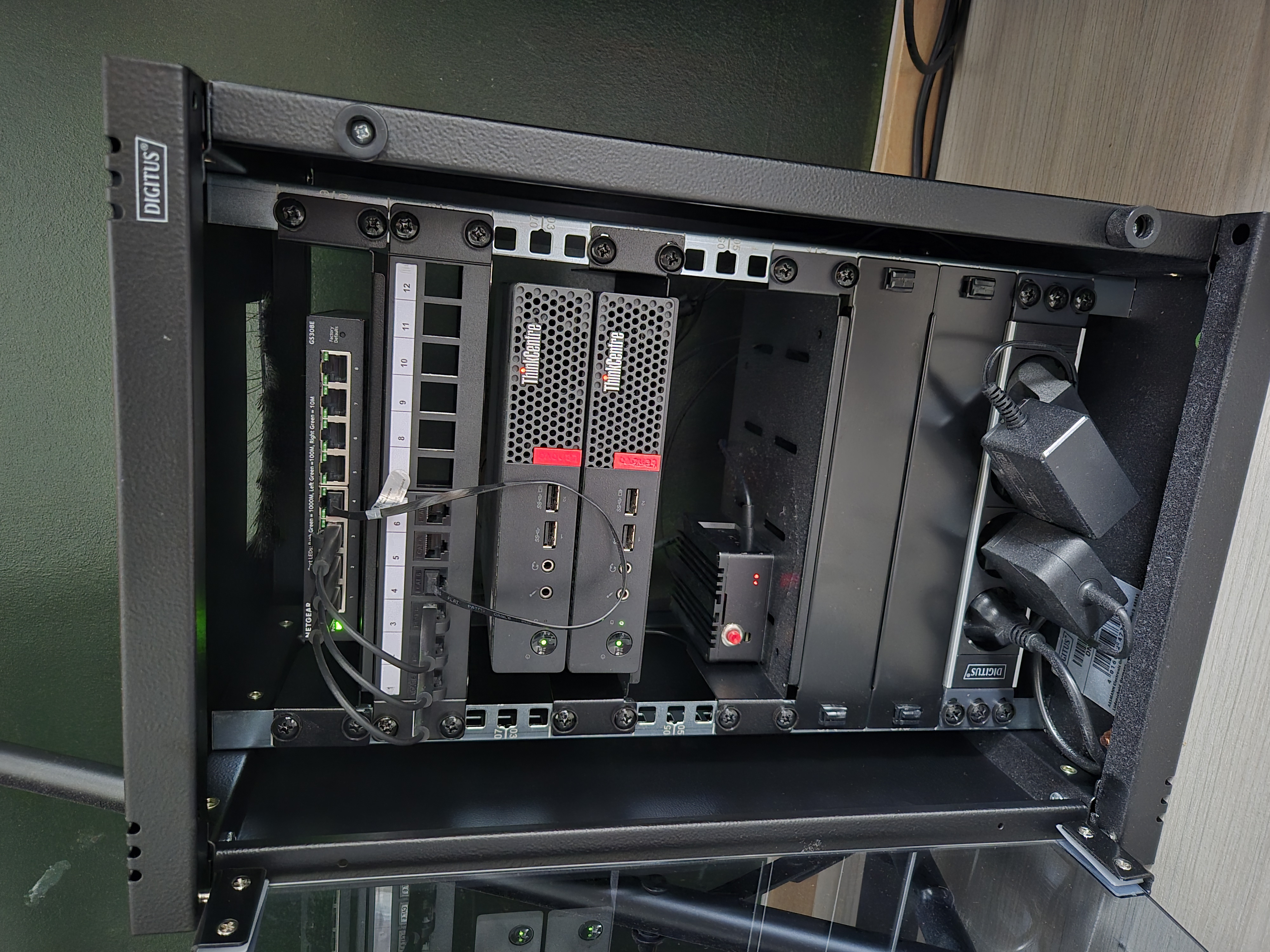
My tiny homelab rack with refurbished ThinkCentres
Thoughts
The main limitations so far have been RAM and storage. I’m considering adding a NAS or swapping in larger SSDs.
Another constraint: both Lenovo MiniPCs only have a single network interface, which limits use cases like hosting firewalls, IDS/IPS, or multi-interface VMs. (There is actually a way around this... Maybe I'll create another post about that). Oh, and you should definitely opt for PoE switch, it makes it much easier to manage the power supply for smaller devices.
In upcoming posts, I’ll go into more detail about the software I'm running on this setup — and the lessons I’ve learned along the way. These homelab related blog posts will act as documentation for myself as well, if I need to refer back to the architectural decisions I made.