

- Published on
Building a Serverless RAG Application on AWS
- Authors

- Name
- Robert Vesterinen
Introduction
With the current climate of AI hype, I decided to start experimenting with GenAI tools and see if I could build a GenAI application that is useful for me personally. Everyone has been talking about agents and agentic AI (OpenAI, Claude Agents), although this is something that I will most likely explore in the future, this time I set my focus on mitigating an issue that has been annoying me since I first used ChatGPT when it came out; LLM hallucination.
The issue with LLMs is that when they don't have an answer to the question that you asked, they usually don't respond with "I don't have the answer". They respond with false information in a very convincing way. Another challenge is that they can also present an answer that is out-of-date or reference non-authoritative sources. Or they may get confused by terminology that has different meanings in different contexts.
One approach of mitigating these issues is called Retrieval-Augmented Generation (RAG).
Retrieval-Augmented Generation (RAG)
Retrieval-Augmented Generation (RAG) is a technique that improves LLM responses by retrieving relevant information from a knowledge base before generating an answer. Rather than relying solely on what the model learned during training, RAG enriches the prompt with up-to-date, domain-specific context — resulting in more accurate and grounded responses.
To understand what RAG aims to solve, we need to learn a bit about how LLMs work. LLMs are trained on a dataset with a knowledge cutoff date. You probably have noticed this if you have asked an LLM about football game results from last night. The current ChatBots have tools that they can use to fetch information from the web so this issue doesn't happen that often anymore. But without any tools, the LLM will most likely hallucinate answers that are beyond the knowledge cutoff date.
LLM training data of course doesn't contain your company's internal documentation or your personal study notes which will also lead to incorrect answers since it doesn't know the industry-specific terminology etc.
So let's summarize the common issues with LLMs that cause hallucinations:
- Trained on a static dataset - LLMs simply aren't trained with information which is outside of this scope
- Learns statistical patterns, not facts - LLMs produce text that sounds right in a very convincing way, but it really isn't true
- Parametric memory - The knowledge is baked into the model's weights. The parametric memory can't be updated without retraining or fine-tuning.
- No source attribution - Can't point to where it got the information from
Ok, so just to recap RAG basically does a semantic search, incorporates the search results (including the content) with the context, and sends them to the LLM. But how does it exactly find the relevant information? That's where we dive into the world of similarity searches and vector stores.
Vector databases and Embedding
Vectors are arrays of numbers that allow machines to understand and process data. They can be generated from source data located in e.g. S3 object storage by using an embedding model such as Amazon Titan Text. The embedding model converts the raw data from the object file into vector embeddings.
The cool thing about these arrays of numbers is that they can be used to find similarities and relationships — not just matching keywords, but actual meaning.
Take for example the word cat and kitten. Or cat and animal. These are words that are close to each other in a vector space. They have similar meaning. Kitten is closer to cat than animal is.
So what can we do with this? Imagine if we convert a question such as Are cats animals? and process that through an embedding model. The embedding received from that question can be used to do a similarity search against the vector database.
The full RAG pipeline
In this case the search (retrieval) would return the source chunks that are closest matches based on semantic meaning. We can incorporate these chunks with the original question (augmentation) to add additional context and forward this to the LLM to process (generation) the answer. LLM can then base its answer on the retrieved content and even add source references to the answer.
In short, we first want to create our vector database which can also be referred to as Knowledge Base:
- Upload your data (text, images, audio) to a data source such as S3 object storage
- Split the data to chunks and ingest the data
- Create embeddings using an embeddings model
- Store the generated embeddings to a vector database
Then perform Retrieval-Augmented Generation
- Send the question to an embeddings model
- Use the generated embeddings to do a search against the vector database
- Send both the returned results and the question to LLM to generate an answer
Here's an example of what a RAG-powered chat looks like in practice:
Are cats animals?
Yes, cats are domesticated animals belonging to the family Felidae. They are small carnivorous mammals that have been kept as pets for thousands of years. Cats are closely related to wild species such as lions and tigers.
Sources:
mammals-encyclopedia.pdf — page 42
pet-care-guide.pdf — page 3
As we can see, we get a response based on the information in the knowledge base and we have the access to the source information as well. This doesn't entirely ensure that the LLM doesn't hallucinate but at least now we can see the sources and give some grounding for its answers.
In the next section we get to the fun part, planning and building the application.
Building the RAG application
This section goes into the architecture and implementation details and assumes that the reader has basic understanding of Python and some cloud engineering concepts.
When selecting the services that should be used for a hobby project, usually the first thing to consider is the cost. And what would be the cheapest option in AWS to run a simple API? Using serverless as much as we can of course!
Service selection
- AWS API Gateway for the simple API management
- AWS Lambda for serverless backend
- AWS Lambda Web Adapter for streaming support and portability (more about this later)
- AWS Bedrock for GenAI related things (Knowledge Base, Embeddings, Generation)
- S3 for documents and vector store. An alternative option was AWS OpenSearch, which has better search options (hybrid keyword + vector search) but it costs a lot (like 300USD/Month).
- S3 + Cloudfront for UI (planned but not implemented)
- AWS Cognito for auth (planned but not implemented)
- AWS DynamoDB for storing sessions (planned but not implemented)
The service selection was steered by operational simplicity and cost optimization. So using AWS managed services as much as possible and utilizing serverless.
Tool selection
- CDK for Infrastructure-As-code
- Projen for managing all project related configuration and tooling
- Pre-commit, Husky etc. for pre-commit hooks and linting
- Github Actions for CI/CD (With CDK Pipelines)
Tool selection was also made pretty much based on operational simplicity. Projen is an excellent tool to spin up a new project with tools already in place for linting, release & package management. And CDK allows us to develop the infrastructure using code rather than clicking through the UI. Also, we can very easily create and destroy the environment when needed.
Architecture
This is the high-level view of the retrieve and generate flow.
AWS Bedrock has an API called RetrieveAndGenerate that combines Retrieve operation with InvokeModel. There is also RetrieveAndGenerateStream which outputs in streaming format which we could use.

Retrieve And Generate Flow
Then we have the knowledge base generation flow. Here we use S3 presigned URLs to upload files to an S3 bucket. The client starts the AWS Bedrock Knowledge Base ingestion job by calling an API. The status of the job can be queried by calling a /kb/status route.
An alternative option to trigger the ingestion job would have been to use EventBridge to catch object created & deleted events and then handle the sync using a separate Lambda function. But I wanted to keep this as portable as possible and avoid having multiple Lambdas so I decided to let the client handle this orchestration completely.
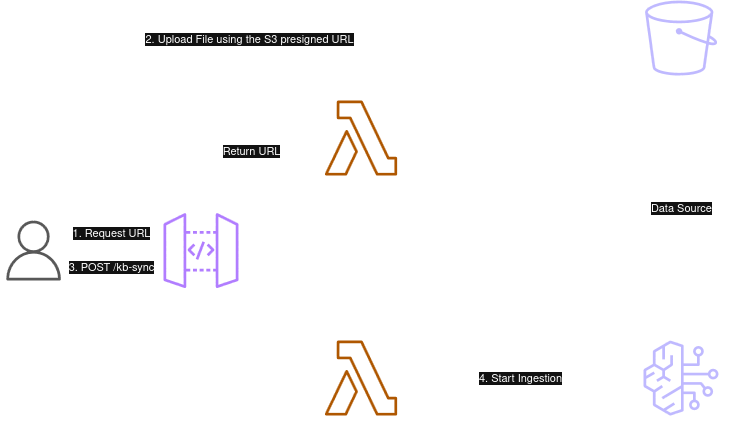
Knowledge Base Sync flow
Backend
Let's start with the backend. Many modern cost optimized APIs are running with API Gateway + AWS Lambda combo. This will scale very well (although we don't need to worry about that with this project) and is quite cheap.
Streaming Setup
AWS added support for streaming to API Gateway REST APIs a while ago which increases the responsiveness of ChatBots. This means that the responses reach the user incrementally near real-time instead of waiting the full response to be generated and then sent. Before this you needed to use Websocket API to enable streaming.
Lambda Web Adapter
So how could this be implemented with AWS API Gateway + AWS Lambda? One option is to use AWS Lambda Web Adapter. This is a Lambda extension that allows you to run web applications on AWS Lambda with using familiar frameworks such as Next.js or FastAPI (basically anything that speaks HTTP 1.1/1.0) by translating the incoming Lambda event into a real HTTP request and forwards it to the web application. It also creates portability since the same docker image can run on different platforms without any modification. And most importantly, it supports streaming.
To enable the LWA, you need to add the extension to /opt/extensions/ directory. In Dockerfile this can be done by copying the extension from Lambda docker image:
FROM public.ecr.aws/awsguru/aws-lambda-adapter:0.8.4 AS lwa
...
COPY /lambda-adapter /opt/extensions/lambda-adapter
# Start uvicorn. LWA routes Lambda invocations to port 8080.
CMD ["python", "-m", "uvicorn", "app.main:app", "--host", "0.0.0.0", "--port", "8080"]
You need to also set these environment variables in the Lambda function CDK construct definition:
const queryHandlerLambda = new DockerImageFunction(this, 'QueryHandler', {
  code: DockerImageCode.fromImageAsset('src/lib/lambdas/query/app'),
  logGroup: queryLambdaLogGroup,
  timeout: Duration.seconds(60),
  tracing: Tracing.ACTIVE,
  memorySize: 256,
  environment: {
    AWS_LWA_INVOKE_MODE: 'RESPONSE_STREAM',
    AWS_LWA_PORT: '8080',
  },
})
On top of this, you need to configure the API Gateway resource to set the Lambda integration URI to be 2021-11-15/functions/ARN/response-streaming-invocations and set the method property Integration.ResponseTransferMode to be STREAM.
const streamingUri = `arn:aws:apigateway:${this.region}:lambda:path/2021-11-15/functions/${queryHandlerLambda.functionArn}/response-streaming-invocations`;

for (const method of [rootMethod, proxyResource.anyMethod!]) {
  const cfnMethod = method.node.defaultChild as CfnMethod;
  cfnMethod.addPropertyOverride(
    'Integration.ResponseTransferMode',
    'STREAM'
  );
  cfnMethod.addPropertyOverride('Integration.Uri', streamingUri);
The backend Lambda checks the field "stream": true in the chat completion request body and returns a Server-Sent Events (SSE) stream:
curl -N https://<api-url>/v1/chat/completions \
  -H "Content-Type: application/json" \
  -d '{"model": "anthropic.claude-haiku-4-5-20251001-v1:0", "messages": [{"role": "user", "content": "What is this document about?"}], "stream": true}'
Each chunk follows the OpenAI SSE format:
data: {"choices": [{"delta": {"content": "The document"}, "index": 0}]}
data: {"choices": [{"delta": {"content": " covers..."}, "index": 0}]}
data: [DONE]
Application Logic
The AWS Lambda function yields chunks immediately as they are received from Bedrock. On top of the basic streaming, there were a few additional considerations:
Citations — I wanted to return source metadata (filename, page number, text excerpt) alongside the generated answer so the user can verify the response.
ConverseStream over RetrieveAndGenerateStream — I initially used the RetrieveAndGenerateStream API but the model didn't respect custom system prompts. So I switched to doing the retrieval separately and using the ConverseStream API, which gave me full control over the message construction.
Intent classification — Not every prompt needs a knowledge base search (e.g. a greeting at the start of a conversation). I added an intent classification step that labels the prompt as either CONVERSATIONAL or RETRIEVAL. To minimize latency, both classification and retrieval run in parallel — so the retrieval call is made and billed even for conversational prompts, but the results are discarded if not needed. This is a deliberate latency-vs-cost trade-off: sequential execution would save costs on conversational prompts but add noticeable delay to every retrieval prompt.
def stream_chat_completion(event: ChatCompletionRequest):
    """Retrieve from KB, then stream LLM response via converse_stream."""
    logger.info("Streaming chat completion request")

    # 1. Classify intent and retrieve in parallel to avoid sequential latency
    query = event.messages[-1].content
    with ThreadPoolExecutor(max_workers=2) as pool:
        classify_future = pool.submit(_needs_retrieval, query)
        retrieve_future = pool.submit(_retrieve, query)

        needs_retrieval = classify_future.result()
        results = retrieve_future.result() if needs_retrieval else []

    if results:
        logger.info(f"Retrieved {len(results)} chunks from KB")
    else:
        logger.info("Skipping retrieval based on query classification")

    # 2. Build citations from retrieved chunks (deduplicated)
    citations = _build_citations(results)

    # 3. Assemble passages text for the prompt
    passages = "\n\n---\n\n".join(r.get("content", {}).get("text", "") for r in results)

    # 4. Build messages and stream via converse_stream
    system_prompt, messages = _build_messages(event, passages)

    response = bedrock_runtime.converse_stream(
        modelId=MODEL_ARN,
        system=[{"text": system_prompt}],
        messages=messages,
    )

    for chunk in response.get("stream", []):
        if "contentBlockDelta" in chunk:
            text = chunk["contentBlockDelta"].get("delta", {}).get("text", "")
            if text:
                data = {
                    "choices": [
                        {"delta": {"content": text}, "index": 0, "finish_reason": None}
                    ]
                }
                yield f"data: {json.dumps(data)}\n\n"

    # 5. Send citations after the text stream completes
    if citations:
        yield f"data: {json.dumps({'type': 'citations', 'citations': citations})}\n\n"

    yield "data: [DONE]\n\n"
So that's the main functionality of the completions API.
API Reference
Here's the list of all APIs that we have:
| Method | Path | Description |
|---|---|---|
GET | /health | Health check |
GET | /v1/models | List available models |
GET | /v1/models/{model_id} | Get model details |
POST | /v1/documents | Get a presigned S3 upload URL |
GET | /v1/documents | List uploaded documents |
DELETE | /v1/documents/{document_id} | Delete a document |
POST | /v1/chat/completions | RAG chat completion (streaming/sync) |
GET | /v1/kb/status | Get KB ingestion job status |
POST | /v1/kb/sync | Trigger KB ingestion |
Frontend
Since I'm not a frontend developer, the frontend was fully vibe coded with Claude Code. I basically just described what I wanted and iterated on the results. The whole frontend was done in a few hours.
Tech Stack
It's a React 19 app built with TypeScript and Vite, styled with Tailwind CSS 4. No component libraries — everything is custom built. The UI has a dark theme with a monospace font (Fira Code) giving it a nice terminal-like feel.
Chat & Streaming
The chat interface handles SSE streaming using the Fetch API's ReadableStream — it reads chunks from the response body, parses the data: lines, and renders content word by word as it arrives. Citations are streamed as a separate SSE event after the text completes and displayed in a collapsible sources panel with filename, page number and an expandable text excerpt.
Conversation sessions are persisted in localStorage — no backend state needed. The full message history is sent with each request, keeping the Lambda stateless. I probably should have used DynamoDB for storing sessions but I decided to move this feature to backlog and implement it later. The trade-off is that the chat sessions are not carried over different browser sessions and devices.
Document Management
For document management, file uploads go directly to S3 via presigned POST URLs — the frontend requests a presigned URL from the backend, then uploads straight to S3 without proxying through Lambda. After upload, the UI triggers a knowledge base sync and polls the ingestion status every 3 seconds until it completes.
Deployment
The frontend is containerized with a multi-stage Docker build (Node for building, Nginx for serving) and deployed alongside the backend. Nginx serves the static assets and reverse proxies /v1/* requests to the backend Lambda (or container). Again, these static assets could have been hosted in S3 + Cloudfront but the fact that I didn't have any authentication in place and the time constraints made me want to just run this on my own homelab server reachable only from my home network.
Final Product
We now have a modern, containerized, portable and responsive web application that is surprisingly useful.
RAG application demo
I immediately tested this with my personal notes and some technical documentation (not about cats and dogs...) and got some good results. The source sections attached to each answer give verifiability by showing the exact text citation the RAG query returned. The Knowledge Base sync is quite fast as well, usually only takes a couple of seconds when uploading or deleting a file.
I showed this project to my friend and he said that this would be quite useful to be used with his study notes e.g. creating sample exam questions or just asking about some niche topic. Maybe I need to productize this and allow my friends to use it as well.
Final Thoughts
This project demonstrated how to make AI more reliable and accurate. That's one of the biggest issues of AI at this moment. How can we trust the answers it generates for us? By using RAG we can ensure that the model has correct and up-to-date context when we ask domain-specific questions. The downside of RAG is that you need to build a RAG pipeline, manage the knowledge base and keep it updated. Fortunately AWS makes this quite painless with its service offering and good support for automation tools such as CDK.
Disclaimer: This project is for demo purposes only, it doesn't have any authentication mechanism or support for multiple users. I also don't plan to maintain this project for long unless I get a motivation boost to actually develop this to a full product. Keep this in mind if you plan to self-host this on AWS or in your own homelab.
I think my next project will also be AI related, maybe related to agents and AWS Bedrock AgentCore.